
A technical SEO audit can produce hundreds of warnings and still miss the problem that is costing the site traffic. The useful work is not collecting a longer error list. It is identifying the issues that prevent valuable pages from being crawled, rendered, indexed, understood, or reached by users.
Use this technical SEO audit checklist to review the areas that matter most, separate genuine risks from harmless noise, and turn findings into a fix plan your engineering, content, and SEO teams can actually execute.
Set the audit scope and collect a baseline
Start by defining what the audit covers. Include production domains, relevant subdomains, language or regional versions, major templates, and any recent migrations, CMS changes, redesigns, or releases. A crawl of only the main marketing pages will not reveal problems hiding in product, blog, support, location, or filtered-category sections.
- Record a pre-audit baseline. Capture organic clicks, indexed-page estimates, conversions, Core Web Vitals, crawl errors, and performance for revenue-critical page groups before changing anything. Without a baseline, it is difficult to prove whether a fix improved visibility or simply coincided with normal traffic variation.
- Define the intended indexation model. Document which URL types should be indexed, such as core product pages and editorial resources, and which should not, such as internal search results or session-based URLs. This gives every indexation finding a clear benchmark.
- Classify every finding consistently. Include impact, effort, confidence, owner, and a validation method in the technical SEO audit report. A suspected issue with weak evidence should not receive the same urgency as a confirmed rendering failure on a top-converting template.
1. Verify crawl access and rendering
Search engines cannot rank pages they cannot reliably access. Begin with key commercial, editorial, and conversion pages, then widen the review to templates and URL patterns that generate pages at scale.
- Confirm that important pages return a 200 status code. A page that appears normal in a browser may still redirect, fail intermittently, or return a soft error to crawlers. Check representative URLs across every important template.
- Review robots.txt, XML sitemap access, and crawl directives. Make sure important sections are crawlable and that sitemaps can be fetched. Also inspect meta robots and HTTP header directives, which can override assumptions made from robots.txt alone.
- Identify server errors and redirect chains. Repeated 5xx responses waste crawl resources and damage user experience. Long redirect paths add latency and make migrations more fragile.
- Check blocked resources. CSS and JavaScript files that are essential to navigation, content, or layout should be available to crawlers. Blocking a script can leave a page technically accessible but practically unreadable.
Review robots.txt and crawl directives
Robots.txt controls crawling, not indexing. A disallowed URL can still appear in search if other pages link to it, so do not rely on a robots.txt block as a substitute for a noindex directive where exclusion is required.
- Check that valuable folders are not disallowed. Review rules affecting product, blog, resource, location, and localized paths, especially after a staging-to-production deployment.
- Flag crawl traps. Faceted combinations, internal search results, calendar URLs, session parameters, and infinite URL spaces can generate huge volumes of low-value pages. Control them with deliberate internal linking, parameter handling, crawl rules, and indexation signals rather than hoping crawlers ignore them.
- Test rules against real URLs. A small syntax error or overly broad wildcard can block more of a site than intended. Verify both individual high-value URLs and representative URL patterns.
Test server responses and JavaScript rendering
Modern sites often depend on JavaScript for navigation, body copy, metadata, canonicals, and structured data. That makes a basic HTML crawl insufficient when critical elements are added only after scripts run.
- Audit status codes at scale. Group 200, 3xx, 4xx, 5xx, and soft 404 responses by template and directory. Also investigate inconsistent responses between mobile and desktop requests if the site uses separate serving or device-specific behavior.
- Compare source code with the rendered DOM. Check whether essential content, internal links, canonicals, titles, meta descriptions, and schema appear after rendering. Missing product details or navigation links matter far more than cosmetic differences in markup.
- Verify Google-visible output on priority templates. Rendering delays and script failures can cause search engines to see less than users do. Focus on pages that support revenue, lead generation, or topical authority first.

2. Check indexability and canonical signals
Not every crawled page should rank, and not every non-indexed URL is a problem. The goal is alignment: the pages the business wants in search should be indexable and clearly preferred, while duplicates and low-value variants should be consolidated or excluded intentionally.
- Inspect index status for priority URLs. Compare intended indexation with sitemap inclusion, canonical tags, noindex directives, redirects, and internal links. A core page should not be simultaneously listed in a sitemap, marked noindex, and linked to through a redirected URL.
- Separate deliberate exclusions from accidents. Thank-you pages, private account areas, and duplicate filter combinations may belong outside the index. A noindexed service page or accidentally canonicalized product page does not.
- Review index coverage by page type. A decline in indexed pages can be harmless if low-value duplicates were removed, or serious if it affects a key template. Aggregate findings by template rather than reacting to one URL at a time.
Find index bloat and orphaned indexable pages
Index bloat occurs when too many low-value, duplicate, or near-duplicate URLs compete for crawling and indexation. Orphan pages have the opposite issue: they may be technically indexable but receive no internal discovery or contextual authority.
- Compare URL sets. Reconcile crawlable, indexable, internally linked, sitemap-submitted, and actually indexed URLs. Differences between these sets often reveal parameter pages, abandoned content, or important URLs that the site barely supports.
- Review edge-case page types. Pagination, filtered results, tag archives, PDFs, expired products, and old location pages need an explicit business decision. Keep them indexable only when they offer distinct, useful search value.
- Restore or retire orphaned pages deliberately. Add relevant internal links to pages worth preserving. Redirect, consolidate, or noindex pages that have no strategic purpose.
Validate canonicalization and duplicate-page handling
A canonical tag is a strong hint, not an instruction search engines must follow. It works best when every supporting signal agrees with it.
- Use self-referencing canonicals on preferred pages. The canonical target should be live, indexable, internally reachable, and substantively equivalent to the source URL.
- Find conflicting signals. Canonicals that point to redirected, blocked, noindexed, or non-equivalent URLs create ambiguity. So do sitemap entries and internal links that consistently favor a different URL than the declared canonical.
- Check duplicates created by URL variants. Protocol, host, trailing slash, capitalization, pagination, tracking parameters, and filters can all create competing versions of the same content.
3. Audit URL changes, redirects, and site architecture
URL management becomes most visible during a migration, but it should be part of every technical SEO audit. Poor redirect handling can erase years of accumulated signals, while a messy architecture makes important pages harder to discover and maintain.
- Normalize URL variants. Consolidate HTTP and HTTPS, www and non-www, trailing-slash, case, and parameter variants into a single preferred URL pattern. The site should not serve multiple accessible versions of the same page.
- Eliminate redirect chains and loops. Aim for a direct, permanent redirect to the final relevant destination when a page has moved. Chains create unnecessary hops; loops prevent access entirely.
- Review hierarchy and URL stability. Important pages should sit in a logical structure, use descriptive paths where practical, and remain stable unless there is a real reason to change them.
Trace redirects from high-value legacy URLs
Do not treat every retired URL the same. Prioritize URLs with backlinks, historical rankings, organic traffic, conversions, or strong internal prominence.
- Map old pages to the closest equivalent replacement. A discontinued product may redirect to its successor or a relevant category, not automatically to the homepage. Broad homepage redirects often create a poor user experience and weak relevance match.
- Verify one-hop permanent redirects. Test legacy URLs through to the final destination, including variants that may have been linked externally.
- Flag misleading error handling. Redirect-to-404 paths, irrelevant destinations, and pages returning 200 with a "not found" message should be corrected. A soft 404 can confuse both users and search engines.
4. Inspect internal linking and navigation
Internal linking is how a site explains relationships between pages and distributes attention toward priorities. Great content can remain underperforming if it is buried behind weak navigation, orphaned from related pages, or accessible only through scripts that fail to render reliably.
- Give priority pages crawlable HTML links. Core commercial and editorial pages need links that search engines can follow, relevant anchor text, and reasonable click depth from major entry points.
- Review sitewide navigation and breadcrumbs. Main menus, footer links, breadcrumbs, pagination, and related-content modules should reinforce a clear hierarchy without generating unnecessary duplicate paths.
- Control faceted navigation. Filters are valuable for users, but uncontrolled combinations can produce thousands of near-duplicate URLs. Decide which filtered states deserve discovery and which should remain out of crawl paths or the index.
- Use log data when available. Crawl reports show what could be crawled; server logs show what search bots actually requested. This distinction helps focus effort on active crawl waste and neglected important sections.
5. Measure page experience and performance by template
Speed audits often go wrong when teams obsess over a homepage score. Users and search engines experience templates, devices, countries, and real network conditions, not one controlled test on one URL.
- Review Core Web Vitals by template, device, and market. Compare product, category, article, landing page, and checkout or lead-generation templates. A slow template used across hundreds of pages is usually more important than a single slow URL.
- Diagnose before prescribing fixes. Identify whether slow Largest Contentful Paint comes from server response, an oversized hero image, blocking CSS, or client-side rendering. Treating every performance issue as an image-compression task wastes engineering time.
- Inspect common delivery problems. Check render-blocking resources, image formats and dimensions, font loading, third-party scripts, caching policies, and CDN behavior. Each can affect performance differently across templates.
Prioritize field data over one-off lab scores
Field data reflects real visitor conditions over time, making it the best starting point for identifying broad experience problems. Lab tests remain useful for reproducing and isolating the technical cause.
- Use field data to find affected audiences. Segment by mobile versus desktop and, where useful, by country or template group. A desktop-only review can miss the issues affecting the majority of organic visitors.
- Use lab tests to validate a fix. Test the same representative pages before and after deployment, then confirm that real-user data improves as enough traffic accumulates.
- Document business impact, not only scores. Note which templates are slow, which user journeys they affect, and whether they support high-value traffic or conversions.
6. Validate mobile usability and responsive parity
Mobile is not a reduced version of the site. If primary content, links, metadata, or interactions disappear or break on smaller screens, the site can lose both search visibility and conversions.
- Confirm mobile content parity. Important copy, structured data, metadata, internal links, and calls to action should be available and functional on mobile. Do not hide meaningful content merely to create a cleaner layout.
- Check basic responsive usability. Review viewport settings, tap target spacing, horizontal overflow, intrusive interstitials, and responsive image behavior. These issues are often easy to spot on representative templates.
- Compare device-specific output. If the site uses dynamic serving, separate mobile URLs, or device-based rendering, inspect both versions for inconsistent content, canonicals, status codes, and navigation.
7. Check XML sitemaps and search-engine discovery signals
An XML sitemap should express the site's intended indexable inventory. It is not a dumping ground for every URL the CMS can generate, and inclusion does not guarantee indexing.
- Include only canonical, indexable 200-status URLs. Remove redirects, noindexed pages, blocked URLs, errors, and duplicate variants. A clean sitemap makes coverage changes easier to interpret.
- Segment large sitemaps by type or locale. Separate products, articles, categories, locations, or language versions so an indexing problem can be diagnosed without sorting through one enormous file.
- Keep lastmod values accurate. Update them when meaningful page content changes, not on every automated build. Unreliable dates reduce the signal's usefulness.
- Compare sitemap inclusion with internal linking. A page submitted in a sitemap but absent from the site's link structure may not be a genuine priority.
8. Audit structured data and SERP eligibility
Structured data helps search engines interpret page entities and may support eligibility for enhanced search appearances. It does not guarantee rich results, and it cannot rescue thin or misleading page content.
- Validate syntax and required properties. Check markup against the appropriate schema requirements and verify that values match visible page content. Incorrect prices, availability, dates, or URLs can create avoidable eligibility issues.
- Use schema types that fit the page. Organization, Product, Article, Breadcrumb, and LocalBusiness markup can be appropriate when the page genuinely supports those entities. FAQ markup belongs only where users can see meaningful, relevant questions and answers.
- Keep entity details consistent. Names, URLs, offers, locations, and other key properties should align across templates and avoid contradicting on-page information.
Find schema conflicts across templates
Schema problems often arise when multiple systems add markup: a CMS plugin, ecommerce platform, tag manager, and custom code can all inject overlapping entities.
- Check for duplicate or conflicting markup. Look for contradictory offers, stale availability, invalid URLs, duplicate organizations, and multiple schema sources describing the same page differently.
- Test representative pages after deployment. One corrected page does not prove a template is fixed. Re-test key page types and monitor search enhancement reports for regressions.
9. Review international and multi-regional technical signals
This section applies only to sites serving multiple languages or regions. If the site has one audience and one version of each page, mark it not applicable rather than manufacturing an international SEO task.
- Validate hreflang return links and language-region codes. Each alternate should reference the correct counterpart, use valid codes, and include a self-reference where appropriate.
- Align hreflang with canonicals and sitemaps. A localized page should generally canonicalize to itself, not to a different language version. Sitemap entries should reflect the same intended URL set.
- Allow users and crawlers to reach each version. Forced redirects based only on IP address or browser settings can obscure user choice and interfere with crawling. Offer clear language or region selection instead.
10. Find security, accessibility, and reliability blockers
Technical SEO depends on a site being available, secure, and usable. These issues are not always labeled as SEO tasks, but they directly affect crawling, trust, and the ability to complete a conversion.
- Verify HTTPS across all assets and templates. Check certificate validity, mixed-content warnings, canonical URLs, and redirect behavior. A secure page that loads insecure assets is still a broken implementation.
- Review reliability issues. Investigate recurring 5xx errors, DNS failures, hosting instability, and broken critical resources. Short outages can be especially damaging when they affect high-traffic sections or occur during major releases.
- Check SEO-relevant accessibility barriers. Use descriptive link text, accessible navigation, functional forms, and meaningful alternatives for essential interactive elements. Focus on barriers that hide content or prevent users from moving through the site.
Turn findings into a technical SEO audit report and fix plan
A flat spreadsheet of tool warnings is not a technical SEO audit report. The useful deliverable is a template-level remediation backlog that tells each team what is wrong, why it matters, who owns it, and how to verify the outcome.
- Group issues by root cause and template. If 500 pages have the same canonical error, create one implementation task with affected examples rather than 500 separate tickets.
- Document the evidence and likely cause. Include affected URLs or templates, crawl or rendering evidence, the observed behavior, likely source of the fault, and the user and SEO impact.
- Assign ownership and retest criteria. Specify whether engineering, content, product, infrastructure, or SEO owns the fix. Define what success looks like, such as a corrected status code, rendered internal link, clean canonical, or improved coverage pattern.
- Sequence work in the right order. Remove crawl and indexation blockers first, then repair redirects, canonicals, and architecture. After that, improve template performance and eligible enhancements such as structured data.
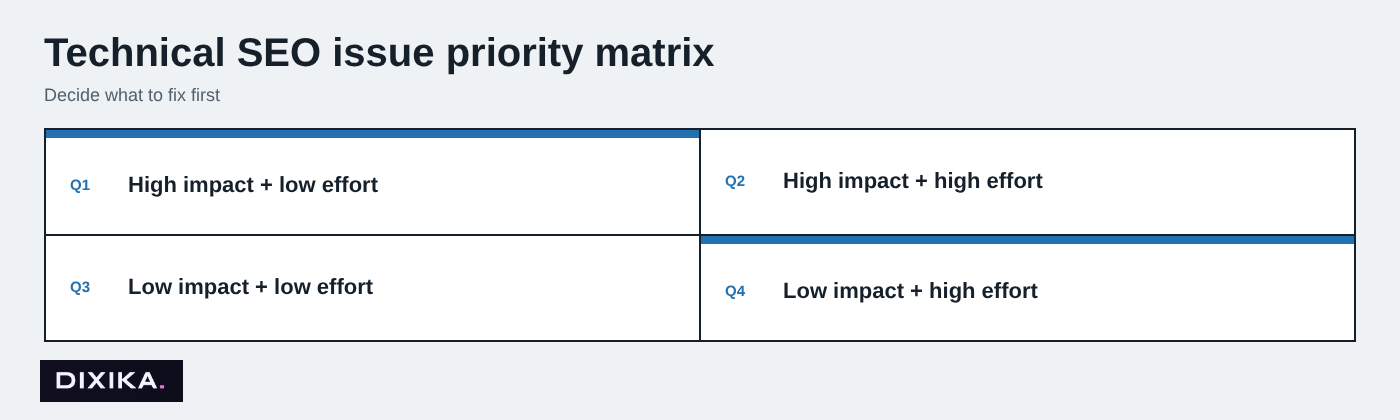
Use a practical priority formula
Priority should reflect opportunity, evidence, and feasibility. The loudest warning in a crawler is not necessarily the issue worth fixing first.
- Score impact by valuable pages affected. Consider traffic, conversion potential, ranking opportunity, and whether the problem affects a single URL or a sitewide template.
- Score confidence by the strength of evidence. Confirmed rendering failures, bad redirects, and noindex mistakes deserve more weight than speculative concerns.
- Score effort with engineering input. A technically elegant recommendation is useless if it cannot be implemented safely within the current stack. Keep quick wins visible, but do not allow minor validation warnings to displace serious indexation failures.
Technical SEO audit checklist: the compact version
For a repeatable audit, start with the must-do checks below. They cover the failure points most likely to limit organic visibility across a modern website.
- Check crawl access and JavaScript rendering. Confirm that valuable pages, content, navigation, metadata, and schema are accessible in both raw and rendered output.
- Review indexability and canonicals. Align noindex directives, canonical tags, internal links, redirects, and sitemap entries with the intended indexation model.
- Audit redirects and URL variants. Consolidate duplicate URL formats and map high-value legacy URLs directly to relevant replacements.
- Inspect internal links and crawl depth. Make priority pages easy to discover through crawlable, contextually relevant HTML links.
- Validate mobile parity. Ensure mobile users and crawlers can access the same essential content, links, markup, and conversion paths.
- Measure performance by template. Use field data to identify real experience problems, then use lab diagnostics to isolate causes.
- Clean XML sitemaps. Submit only canonical, indexable, 200-status URLs that deserve to be indexed.
- Validate structured data. Match markup to visible content and prevent plugin or template conflicts.
- Check security and reliability. Resolve HTTPS issues, recurring server errors, broken resources, and critical usability barriers.
Use log-file analysis, hreflang validation, advanced faceted-navigation controls, and granular international segmentation when the site architecture requires them. They are valuable additions, but they should not distract from broken crawl paths, rendering failures, poor canonicalization, or indexation mistakes.
Rerun focused checks after each significant release, validate fixes on representative URLs, and track indexed coverage alongside organic traffic and conversions. For complex sites or a backlog that needs a clear implementation plan, technical SEO experts can help turn audit evidence into prioritized SEO work. Dixika can help with that process.