You publish a useful page, add it to your sitemap and wait. Search Console eventually shows that Google visited it, but the page still sits under “Crawled — currently not indexed.” It is tempting to press Request indexing again or rewrite everything. Neither tells you what went wrong.
The status means Google crawled the URL but has not included it in its index. It does not identify a single cause or promise that indexing will happen later. Google’s explanation of the status also says the unchanged URL does not need to be resubmitted for crawling.
For a business, the practical question is whether important pages are being missed. An excluded service page deserves a different response from an RSS feed. This guide walks through a diagnosis you can use before assigning development or content work, with a simple way to record the evidence behind each decision.
First, separate crawling from indexing
Crawling is Google retrieving a page. Indexing is processing its content and deciding what to keep in the search index. Google describes these as separate stages; a successful crawl does not guarantee inclusion or rankings.
“Discovered — currently not indexed” is a different starting point: Google knows the URL but has not crawled it yet. Do not treat both labels as the same problem. If the page has already been crawled, repeatedly telling Google that it exists will not explain the indexing decision.
Start with one important URL and one comparable indexed page from the same section of your site. Comparing like with like is more useful than investigating a service page, a tag archive and a tracking URL as if they were equivalent.
1. Decide whether this URL belongs in search
Ask what a person would gain by landing on this page directly from Google. A product page with useful specifications, an original tutorial or a service page explaining a distinct offering may have a clear purpose. A print view that repeats an article usually does not need its own search listing.
Write down the intended outcome before touching any settings: index this page, consolidate it with a better version, or deliberately keep it out of search. The goal is not to make the excluded-page count reach zero.
Do not remove pagination or navigation pages simply because they are not indexed. They may still help users and crawlers reach deeper content. And if you discover confidential material, handle access control separately: Google’s guidance on controlling shared content distinguishes password protection from search-indexing controls. Robots.txt is not a privacy barrier.
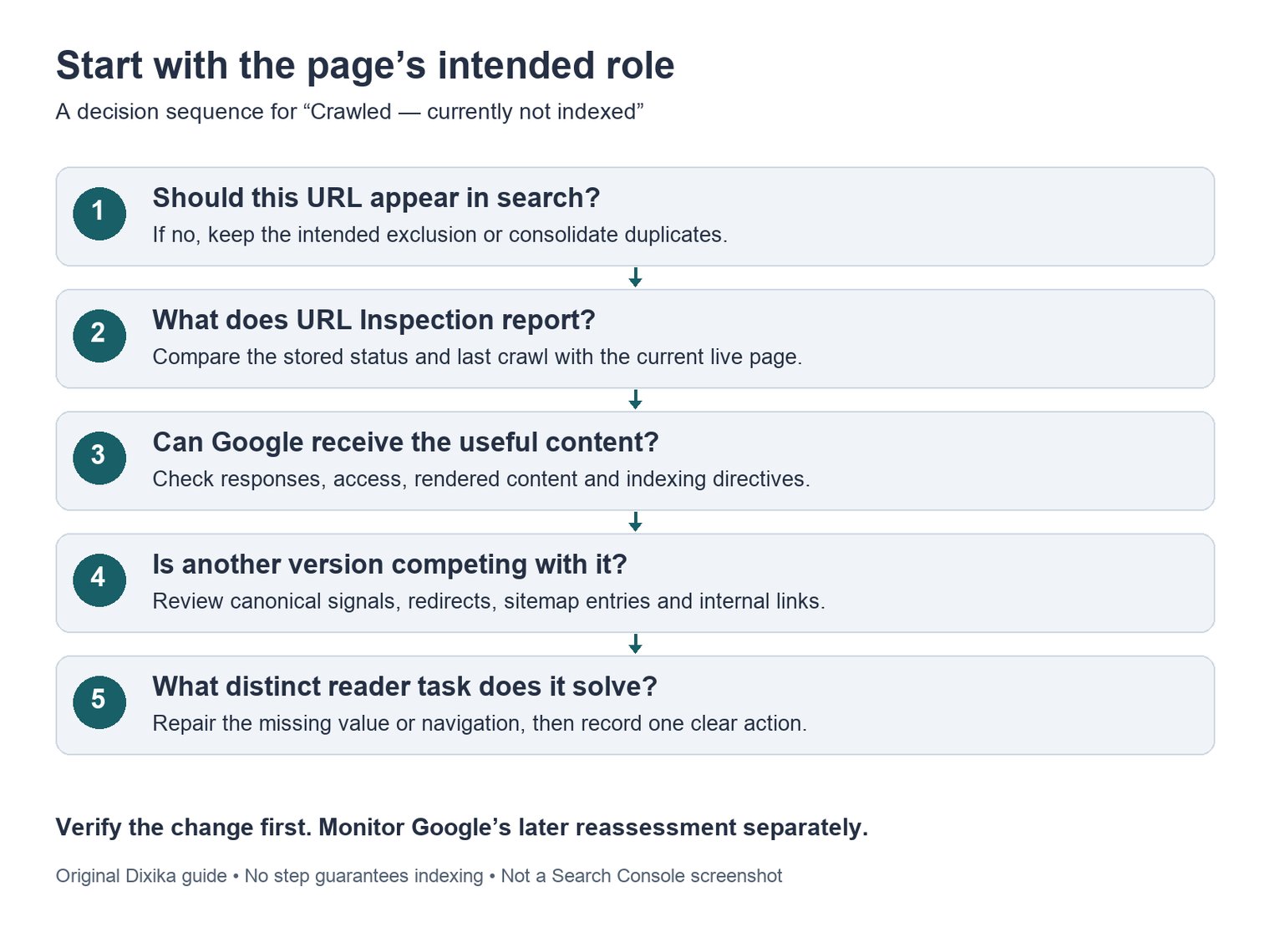
Use the sequence to choose an investigation, not to assume that every excluded page needs the same fix. This is an original explanatory diagram, not a Search Console screenshot.
2. Check the individual URL and the timing
Open URL Inspection for the exact address. Record its reported indexing state and last crawl, then compare the crawl with your latest meaningful change. If you fixed the page yesterday but the reported crawl happened before that, you are looking at evidence of the old version.
Next, run a live test to check present access. Inspect the returned HTML and screenshot where available. Does the main content appear? Is it replaced by a login screen, an empty application shell or an error message?
The distinction matters: the stored inspection result describes Google’s known version, while the live test checks the current page. A successful live test does not prove indexing, and it does not resolve every issue, including Google’s canonical choice.
A site: search can be a useful extra observation, but do not use its result count as your inventory. Google explains that site searches do not return every indexed URL. Keep the exact URL and the inspection evidence together rather than switching between slightly different addresses.
3. Rule out a delivery or rendering problem
A page that looks fine in your logged-in browser can behave differently for a crawler. Check the public version, its HTTP response, the main content and any resources needed to display it. A 200 response is only a starting point: Google can receive a successful response without indexing the content.
Look for a concrete discrepancy you can reproduce. For example, the desktop page might show a detailed guide while the mobile layout displays only a loading message. Or a security layer might occasionally replace the page with a challenge. Record what was returned and when; a single successful test does not explain an intermittent failure.
For JavaScript sites, compare the initial HTML with the rendered result. Google uses rendered HTML when processing JavaScript pages, so check that the useful content and links survive rendering. Do not assume that a missing paragraph means all JavaScript must be removed.
Also check for an accidental noindex directive or a newly introduced robots rule. These have their own reporting categories when Google detects them. Finding one now is evidence about the live page, not proof that it caused the earlier “Crawled — currently not indexed” label.
4. Check for competing versions of the page
Compare the URL with similar pages on your site. Common examples include a tracking-parameter version, two guides answering the same question, or several location pages whose only difference is the place name.
Where the information is available, compare your declared canonical with Google’s selected canonical. Then review redirects, sitemap entries and internal links for conflicting preferences. If your links point to one version and the canonical points to another, make the intended destination consistent.
Google’s canonicalization guidance treats canonical annotations as signals, not commands. Use them for duplicate or substantially similar pages. Pointing every excluded URL at the homepage does not repair a collection of distinct pages.
If two articles solve the same reader problem, decide whether they should become one stronger resource. If they serve different needs, make that difference clear in the actual content, examples and navigation. A new title alone will not create a distinct purpose.
5. Look at usefulness and internal discovery together
Once the page can be delivered correctly, read it as someone arriving with the query you want it to answer. Can that person finish the task? What can they learn here that the neighboring pages do not already explain?
For a service page, useful additions might be the work included, the inputs needed, the deliverables and who the service suits. For a tutorial, the missing piece might be a working example or an explanation of a failure case. Those are editorial decisions based on the reader’s task, not a target word count. Google’s people-first content guidance explicitly rejects the idea of a preferred word count.
Then follow the path a reader would take to reach the page. Is it linked from a relevant category, a related guide or the service overview? Add a descriptive link where it genuinely helps the next step. A sitemap can support discovery, but it does not guarantee crawling or indexing.
When many important pages share the same symptom, investigate the template or section before commissioning dozens of separate rewrites. Dixika’s guide to choosing a technical SEO audit service explains how to turn that investigation into a scope, implementation tickets and acceptance criteria.
Turn the diagnosis into one clear next action
The examples below are illustrative, not client cases or measured indexing results. They show how evidence changes the next action.
|
Example finding |
Next action |
What to verify afterward |
|---|---|---|
|
A useful tutorial renders as an empty shell in the test |
Repair content delivery on that template |
The tested HTML contains the tutorial and its links |
|
A parameter URL repeats an indexed clean URL |
Align canonical signals and internal links |
The preferred URL is used consistently |
|
A service page is accessible but repeats a generic overview |
Add the distinct service details the reader needs |
The page answers a separate task and is linked in context |
|
The reported crawl predates a shipped fix |
Record the change and monitor for a new crawl |
Reassess after Google has seen the changed version |
For your own worksheet, keep one row per URL with the intended outcome, reported status, last crawl, live-test observation, proposed change, owner and follow-up result. Include a link to the evidence. “Improve quality” is difficult to assign; “replace the empty template with the complete tutorial and verify the rendered HTML” gives a developer something testable.
After a meaningful change, you can request a recrawl for a small number of URLs. For many changed pages, use the sitemap approach described in that guidance. Repeated requests for the same URL do not make crawling faster, and neither method guarantees indexing.
Separate two milestones: your fix working on the live page, and Google reassessing that page later. A rising indexed count is encouraging, but check whether the important URLs are included and whether they begin receiving relevant search impressions and clicks. Do not declare success because a URL moved to a different exclusion category.
If the investigation spans several templates, a migration or inconsistent canonical signals, contact Dixika with a sample of affected URLs. Include what changed, what Search Console reports and which pages matter commercially. That gives the review a useful starting point: resolving a specific obstacle between your content and the people searching for it.