A local LLM can keep sensitive campaign data inside your environment, reduce dependence on API usage, and make repeatable marketing workflows easier to control. It can also become an expensive science project if you choose a model because it tops a leaderboard rather than because it solves a real team problem.
The right approach is simple: define the work, test the smallest viable setup, and expand only when the results justify the added hardware and operational burden.
- Define the marketing task.
- Audit hardware, privacy, and operating constraints.
- Shortlist candidate models.
- Run a controlled pilot.
- Evaluate results against real work.
- Integrate approved workflows with human review.
- Operate and retest the system over time.
Define the marketing job before choosing a local LLM model
A local LLM model is a language model you download and run on hardware you control, such as a laptop, workstation, or private server. Unlike a cloud-only AI service, prompts and outputs can remain within your own environment, subject to how you configure the runtime, logging, and connected tools.
That distinction matters most when your team handles nonpublic material: customer research, campaign performance data, unreleased product positioning, internal briefs, sales transcripts, or content plans. But privacy alone is not a sufficient reason to deploy locally. Start by naming the exact job the model needs to do.
- Summarize approved research and campaign documents.
- Extract entities, themes, claims, and metadata from content at scale.
- Create first-pass briefs, outlines, title variations, and repurposing drafts.
- Search approved internal knowledge such as brand guidelines or case studies.
- Assist with local coding and automation for reporting or content operations.
Be precise. "We want an AI assistant" is not a use case. "We need to classify 2,000 existing articles by audience, funnel stage, and primary topic in a consistent CSV format" is a use case you can evaluate.
It also helps to clear up two common terms. ChatGPT is an LLM-powered application: it provides an interface around large language models and related tools. NLP, or natural language processing, is the broader field concerned with enabling computers to work with human language. LLMs are one modern approach within NLP, not an alternative to it.
For many structured jobs, traditional NLP methods, rules, or smaller classifiers may still be the better choice. Use an LLM when the task requires flexible interpretation or generation; use a simpler method when predictable extraction is all you need.

Decide whether a local LLM is better than ChatGPT for your team
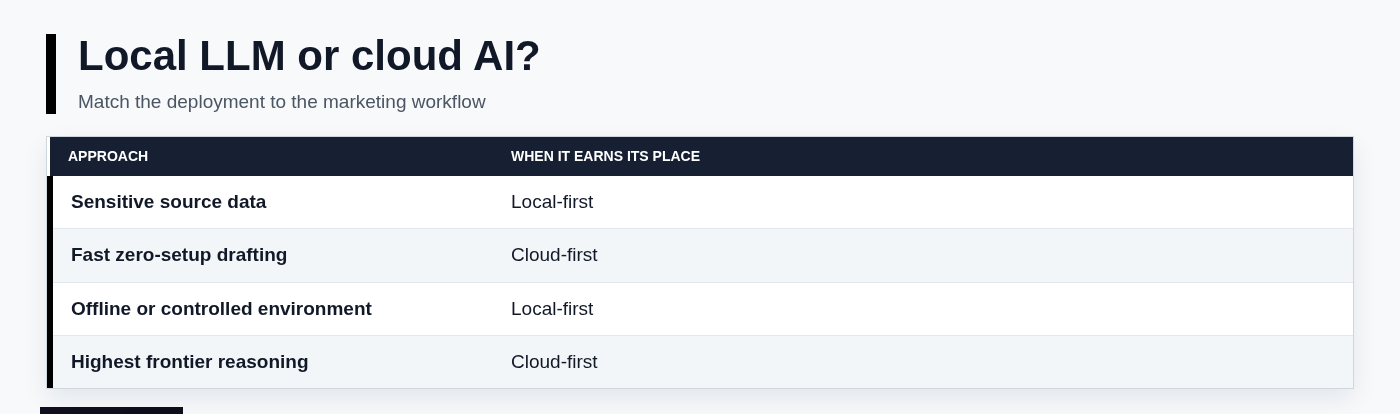
A local LLM is not universally better than ChatGPT or another cloud AI service. It is better when privacy, control, offline availability, or predictable marginal cost matter more than immediate setup and access to the strongest hosted models.
Cloud AI is usually the better default for teams that need high-quality reasoning quickly, have limited technical ownership, or collaborate across many locations. A local deployment often requires more upfront work: selecting hardware, configuring a runtime, maintaining versions, and defining access controls.
Use these questions to decide which deployment fits:
- Data sensitivity: Can source material leave your approved environment?
- Quality requirement: Is this routine extraction, or nuanced strategy and research synthesis?
- Volume: Will the model process enough material to justify setup and infrastructure?
- Hardware: Do you already own suitable machines or GPUs?
- Collaboration: Does one analyst need the tool, or does an entire department need reliable access?
- Integration: Must the model connect to internal files, a CMS, spreadsheets, or reporting workflows?
There is no single "smartest" or "most powerful" AI for every marketing task. Comparisons between ChatGPT, Claude, other cloud platforms, and local models are only useful when the test prompt, source material, review standard, and operating constraints are the same. A model that produces excellent long-form synthesis may be slower or less reliable at valid JSON extraction. Another may be ideal for coding but weak on brand-sensitive copy.
Audit hardware, privacy, and operating constraints
Parameter count is not a hardware plan. A model may technically run on a machine yet be too slow, consume too much memory, or leave too little capacity for the documents and context your team needs to process.
Before downloading anything, record your available RAM or unified memory, GPU type and VRAM, CPU, free disk space, operating system, and whether the machine will serve more than one person. Consider power use and cooling for a machine that will run continuously, especially if you plan a shared internal service.
Quantization is central to local deployment. A quantized model uses compressed weights, which reduces memory use and often makes local operation practical. The tradeoff can be some quality loss, though the impact varies by model and task. Context length matters too: a model can be small enough to load but still struggle when asked to work with long research documents, several source files, or a large internal knowledge base.
Also measure tokens per second and concurrent users. A model that feels acceptable for one person may become unusable when three people send requests simultaneously.
Marketing teams frequently overlook governance. Decide which documents are approved for use, how long prompts and logs are retained, who can access the system, whether outputs are stored, and who reviews external-facing claims. Read the model license before commercial deployment; "free to download" does not always mean unrestricted for every commercial use.
Use hardware tiers to narrow the candidate list
These ranges are useful starting points, not guarantees:
- 8-16 GB RAM or unified memory: Smaller quantized models for basic classification, short summaries, simple metadata, and lightweight drafting.
- 16-32 GB: More capable 7B to 14B-class models, often suitable for routine marketing operations and modest context windows.
- 32 GB or more, or substantial dedicated GPU VRAM: Larger models, longer contexts, and better headroom for more demanding synthesis or shared usage.
Do not infer your results from a benchmark chart. Run the candidate model on the exact machine your team will use, with representative source documents and realistic prompt lengths. The relevant question is not whether it loads. It is whether it completes useful work quickly enough for people to adopt it.
Shortlist models by marketing task, not a generic "best" ranking
Model families to test against your requirements
Several model families can run locally, often through downloads hosted on Hugging Face or official repositories. Qwen, Gemma, Llama, Mistral, and gpt-oss are commonly considered by teams building local workflows, but the best local LLM depends on task requirements, language coverage, licensing, and available hardware.
Do not search for one permanent winner among local LLM models. Model releases, licensing, runtime support, and hardware efficiency change quickly. Instead, select two or three candidates that suit your work, then verify the current model card, available quantizations, license terms, and runtime compatibility before deployment.
- Qwen: Often worth testing for multilingual work, structured extraction, and general-purpose marketing assistance.
- Gemma: A practical family to evaluate when you need compact variants and an ecosystem with broad local runtime support.
- Llama: Commonly supported across local tools and useful as a baseline for general writing, summarization, and internal Q&A.
- Mistral: Often considered for efficient general-purpose generation and coding-adjacent workflows.
- gpt-oss: Worth assessing where its available variants, deployment requirements, and license align with your environment.
The most useful free LLM is the one that meets your acceptance criteria on your hardware and can legally support your intended use. A small model that reliably formats campaign data into valid CSV may create more value than a larger model that writes impressive prose but requires constant correction.
Choose a small, efficient model for everyday marketing operations
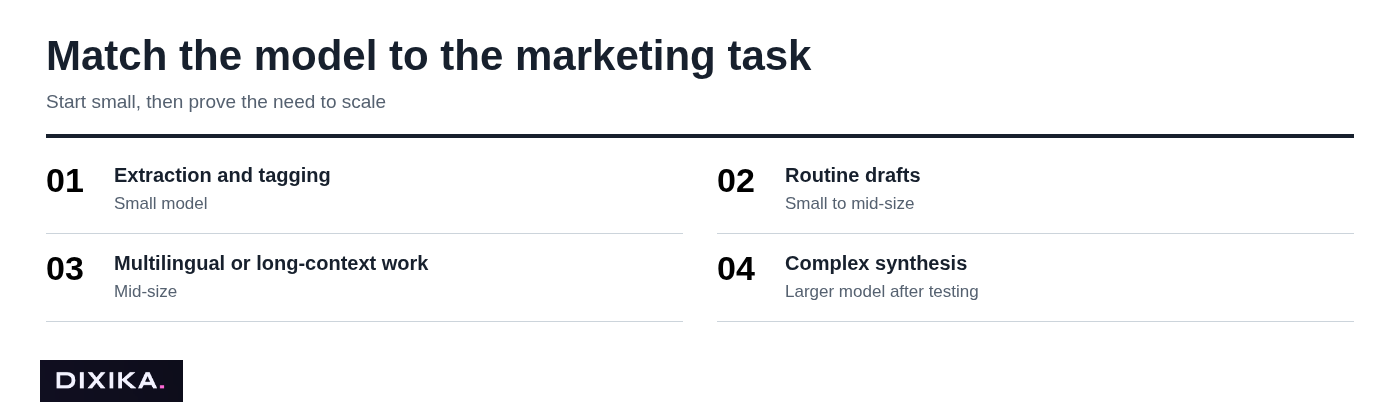
Start with a smaller quantized variant for recurring operational work: content tagging, brief extraction, metadata drafts, transcript summaries, FAQ clustering, and controlled repurposing. These tasks benefit from speed, consistency, and low hardware requirements more than frontier-level reasoning.
Use a fixed system prompt and a clear output schema. For example, ask the model to return exactly five fields for each article: primary topic, target audience, funnel stage, search intent, and recommended internal link category. Validate the format automatically before anyone uses the output.
The tradeoff is straightforward: smaller models are fast and inexpensive to run locally, but they are less dependable on ambiguous strategy work, multi-step analysis, and subtle brand voice decisions. Treat them as production assistants, not autonomous strategists.
Use a larger model only when evaluation proves the quality gain
Larger local models can be useful for complex synthesis, approved-document Q&A, multilingual editorial support, and higher-stakes internal assistance. They demand more RAM or VRAM, longer response times, and more disciplined operational management.
A common mistake is choosing the largest model that barely fits in memory because it appears at the top of an LLM benchmark. That usually produces slow responses and little measurable benefit. Compare its output against a smaller option on brand adherence, factual grounding, valid formatting, and editor time saved. Keep the larger model only if the quality improvement is meaningful enough to justify the latency and infrastructure.
Choose a local runtime and a team-friendly access pattern
The model is only one layer of the stack. Your team also needs a runtime to execute it, an interface or API to use it, and controls that keep the workflow consistent.
For a proof of concept, desktop runtimes are usually enough. For department-wide adoption, a shared internal service is usually safer than asking every marketer to install different local LLM models and prompts on their own machines.
Start with a desktop runtime for a fast proof of concept
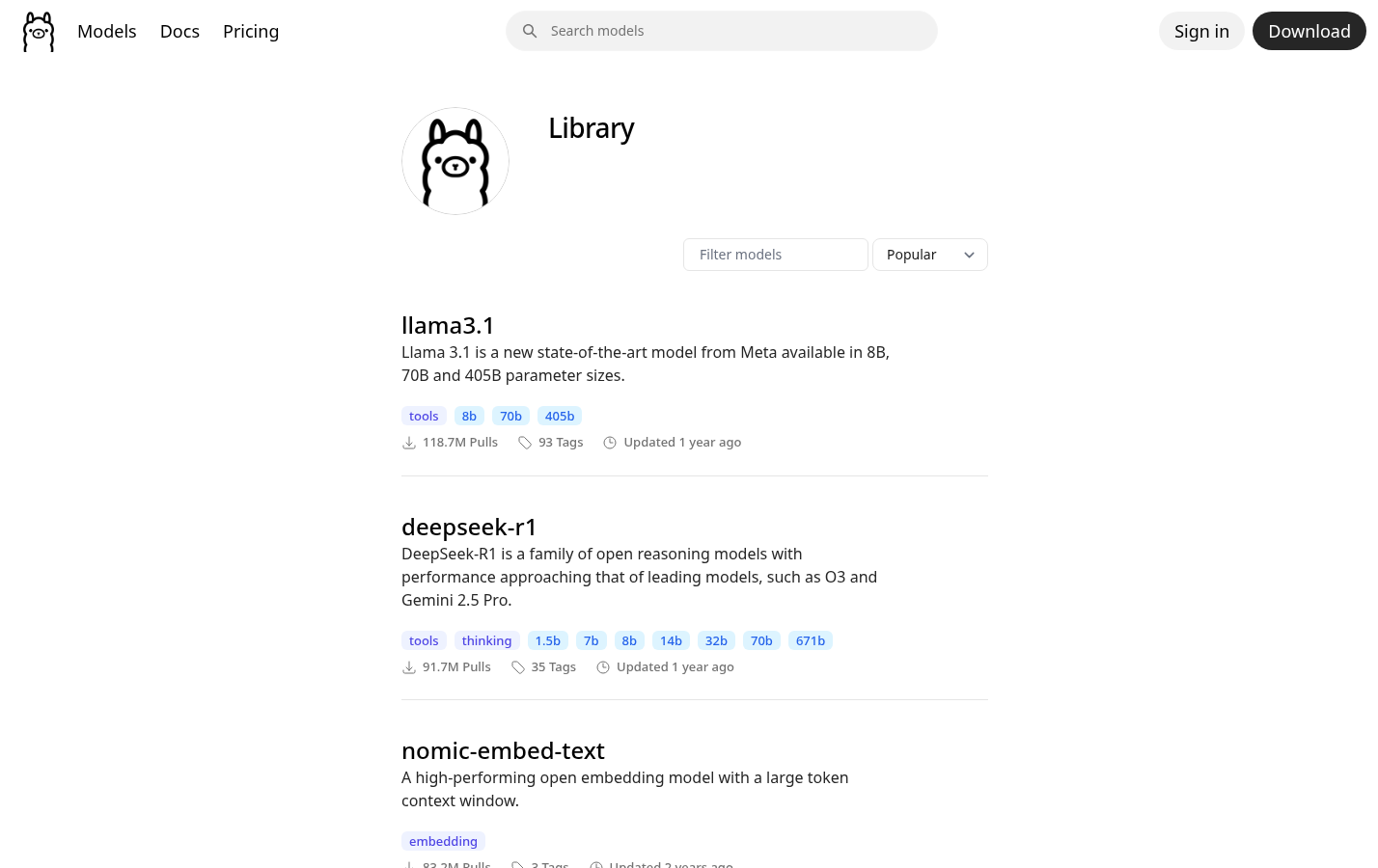
Use a desktop setup when one marketer, SEO manager, or analyst is testing a low-risk workflow with approved files over a short evaluation period. Ollama and LM Studio are common local runtime options, and both can make it easier to download and run compatible models without building a full infrastructure layer.
Use official documentation and official model sources for installation. Avoid random download links, copied command snippets, or unverified local LLM model GitHub repositories. Verify the publisher, review the model card, and confirm that the file format matches your runtime before pulling a large download.
You do not need Python to begin. A chat interface is enough to validate whether the model can follow your prompts and produce useful outputs. Python becomes valuable when you need repeatable batch operations, such as sending 500 approved content records through the same extraction prompt.
Move to a shared service only after ownership and controls are defined
A shared internal endpoint can support a CMS, spreadsheet workflow, or Python automation while ensuring everyone uses the same approved model version. But do not move to this stage until there is a named technical owner responsible for uptime, access, updates, and incident response.
At minimum, define authentication, role-based access, logging policy, model version pinning, backup procedures, and a process for handling failed requests. Keep API credentials and source data inside approved environments. A shared endpoint without ownership is not a platform; it is an unsupported dependency.
Download, run, and test one model in a controlled pilot
Keep the first pilot narrow. Select one approved model, one runtime, and two or three repeatable marketing tasks. This makes it possible to identify whether failures come from the model, prompt, source material, hardware, or workflow design.
- Select a model from its official repository or verified Hugging Face model card.
- Check commercial licensing, supported languages, context limits, and published safety guidance.
- Download a compatible quantized format for your chosen runtime.
- Install the model locally and confirm it responds without relying on a cloud fallback.
- Run a fixed prompt set using sanitized, approved sample material.
- Record results in a simple evaluation sheet.
Document the model name and version, quantization, context window, runtime version, machine specifications, system prompt, temperature, top-p setting, and output format. Without this record, you cannot reproduce a good result or diagnose a bad one.
For factual extraction and structured marketing work, start with conservative generation settings. A temperature around 0.1 to 0.3 is a sensible starting point because it reduces unnecessary variation. Raise it only for tasks where you explicitly want creative options, such as headline alternatives.
Do not assume every model download is safe because it appears in a public repository. Check source provenance, scan files according to your organization's security process, and follow restrictions in the model card. Local installation changes where inference happens; it does not remove normal security responsibilities.
Evaluate the model with a marketing benchmark that reflects real work
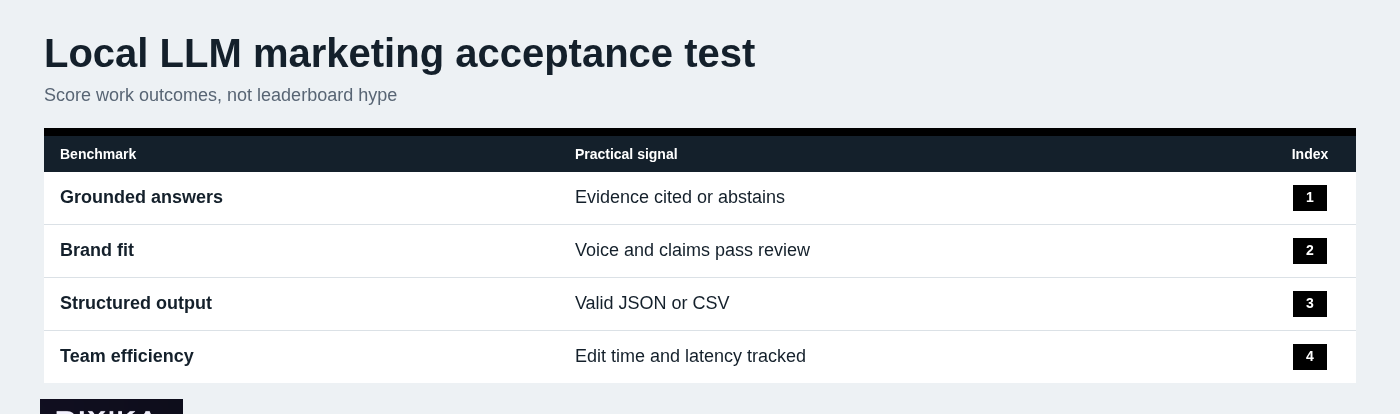
Generic benchmark scores are a weak proxy for marketing value. Build a small acceptance test from sanitized examples your team actually encounters, then compare the local model with your current manual or cloud-based baseline.
A useful initial test set may include 20 to 40 examples across several tasks:
- Summarizing a campaign brief without losing required constraints.
- Creating persona-safe copy variants from approved messaging.
- Extracting SEO entities, topic relationships, and content opportunities.
- Grouping content gaps into clear clusters with sensible labels.
- Answering questions from approved documents while identifying the source.
- Returning valid JSON or CSV that can move into a spreadsheet or CMS.
Score each output on factual grounding, adherence to brand guidelines, formatting compliance, edit time saved, latency, cost, and unsafe or fabricated claims. If a model cannot produce a valid schema consistently, it is not ready for an automation workflow, no matter how fluent its prose sounds.
Measure quality and operational fit separately
Separate the quality score from the operational score. A model may produce strong drafts but be too slow to use. Another may be fast but create more review work than it saves. Both conditions matter.
For quality, measure whether the answer is grounded in provided sources, follows brand rules, handles multilingual nuance appropriately, and abstains when the evidence is missing. For operations, track latency, failure rate, hardware utilization, setup time, and the number of editor interventions required.
LLM model benchmarks can help you form an initial shortlist, but they should be one signal only. They rarely capture your product vocabulary, your editorial standards, or the consequences of a false claim in published content.
Add approved knowledge without turning the model into a source of truth
A local model does not automatically know your current messaging, product changes, or approved customer proof. Retrieval-augmented generation, often called RAG, addresses that problem by finding relevant approved documents at request time and giving them to the model as context.
Start with a narrow knowledge base: brand guidelines, product messaging, current editorial standards, approved case studies, and a small set of verified FAQs. Do not load every drive folder into the system. Large, poorly governed source collections create permission problems and make retrieval less reliable.
Require outputs to include source references where practical. Configure the workflow to say "I don't know based on the provided sources" when evidence is absent. Run freshness checks on time-sensitive materials, enforce permissions-aware retrieval, and require human review for external claims.
RAG improves grounding, but it does not make the model infallible. The model can still misread a source, combine facts incorrectly, or state a conclusion more strongly than the evidence allows.
Integrate the local LLM into marketing workflows with human review
Begin with low-risk, repeatable work that is easy to inspect. Good early uses include internal content tagging, transcript summarization, structured brief extraction, outline variations, metadata suggestions, and QA checks against an approved checklist.
Connect the model through a local API, permitted no-code automation, or a Python script. A Python workflow is especially useful for batch work: a script can send rows from a CSV to a local endpoint, validate the returned schema, flag failures, and write approved fields back to a spreadsheet.
Use human review gates for anything published externally, regulated or legal claims, customer data, budget decisions, or audience targeting. The model can accelerate preparation and analysis, but accountability should remain with the person who approves the output.
For SEO and content teams, the strongest use is often not automated article writing. It is turning scattered source material into structured, reviewable inputs that make human planning and editing faster.
Operate the local model as a product, not a one-time install
A successful pilot needs ongoing ownership. Monitor latency, failed outputs, hallucination patterns, user adoption, hardware utilization, and changes in performance as source documents, campaigns, or model versions evolve.
Use a lightweight change-management policy. Pin the production model and runtime versions, retain representative evaluation samples, retest before upgrades, and keep a rollback option. A new release may improve general performance while breaking the prompt format or output schema that supports your workflow.
Review the economics as well. Local inference may reduce per-request fees, but it still has costs: hardware, electricity, maintenance, security review, technical support, and lost productivity during failures. Calculate value from edit time saved and quality improvements, not from an assumption that local means free.
There are clear cases where you should stop investing in a local-only setup. Use a cloud model or hybrid workflow when the quality gap is material, infrastructure work outweighs the benefit, the team needs robust collaboration features, or a task requires capabilities your local environment cannot reliably provide.
Make a defensible local LLM decision for your marketing team
Choose a local LLM model by defining the marketing job first, then constraining the options by hardware, governance, and expected quality. Test a small shortlist on real, sanitized work. Scale only when the measured gains in privacy, speed, control, or efficiency are worth the operating cost.
The best outcome is rarely replacing every cloud tool. It is building a deliberate workflow where local models handle the work they are suited for, people retain review authority, and higher-capability cloud tools remain available when they provide a clear advantage.
Teams that want to connect local AI experimentation to a broader search visibility and content system can review our services or explore Dixika.